


Create a Faceless Video Effect in Minutes
Easily add a faceless video effect to your content. Perfect for ads and social media! Get started with Sleepy Motion’s smart captions.
What is a Faceless Video Effect?
A faceless video effect allows you to create engaging visuals where the subject is present, yet their face is not the focus. This technique is especially popular in short-form content and video ads, where the emphasis is on the message rather than the speaker's identity. By using advanced masking techniques, your captions can appear behind the subject, making them visually appealing without drawing attention away from the content.
Why Use a Faceless Video Effect?
Using a faceless video effect can make your video content more dynamic and engaging. It helps maintain viewer attention on the message rather than the individual. This is particularly useful for brands that want to convey professionalism or when the speaker's identity isn't crucial to the message. For instance, in a product demonstration or an informational video, the focus can remain on the product or information rather than the presenter.
How to Create a Faceless Video Effect with Sleepy Motion
Creating the faceless video effect is straightforward with Sleepy Motion's Composite caption mode. Here's how it works:
- Upload Your Video: Start by uploading your video in MP4 or MOV format.
- Select Composite Mode: This mode automatically masks your subject, allowing the animated captions to render behind them.
- No Manual Work Required: Unlike other tools that require meticulous editing and rotoscoping, Sleepy Motion handles it all from one upload. You just upload and let the engine do the work.
Example Use Cases
For Short-Form Creators: If you're making a quick Instagram Reel demonstrating a product, you can upload your video, select the Composite mode, and instantly get captions that pop behind your product. This keeps the focus on what you're showcasing while still conveying your message clearly. For Video Ads: Imagine creating a promotional video for a service where the speaker discusses key features. With the faceless video effect, their words can come alive behind the product visuals, ensuring viewers remain engaged without being distracted by the speaker’s face. This allows for a clean, professional look.Style your captions
Describe the look, then drop in your video on the next step.
Practical Steps to Get Started
- Sign Up for Sleepy Motion: You can start with the Free plan, which includes up to 15 seconds of video and comes with watermarked captions.
- Upload a Video: Make sure your video is under 150MB (or 35MB for the Free plan) and can be either vertical or horizontal.
- Select Your Caption Look: Use one of the presets like Paper Fluo or Viral Insta to enhance the visual appeal of your captions, selecting the Composite mode to achieve the faceless effect.
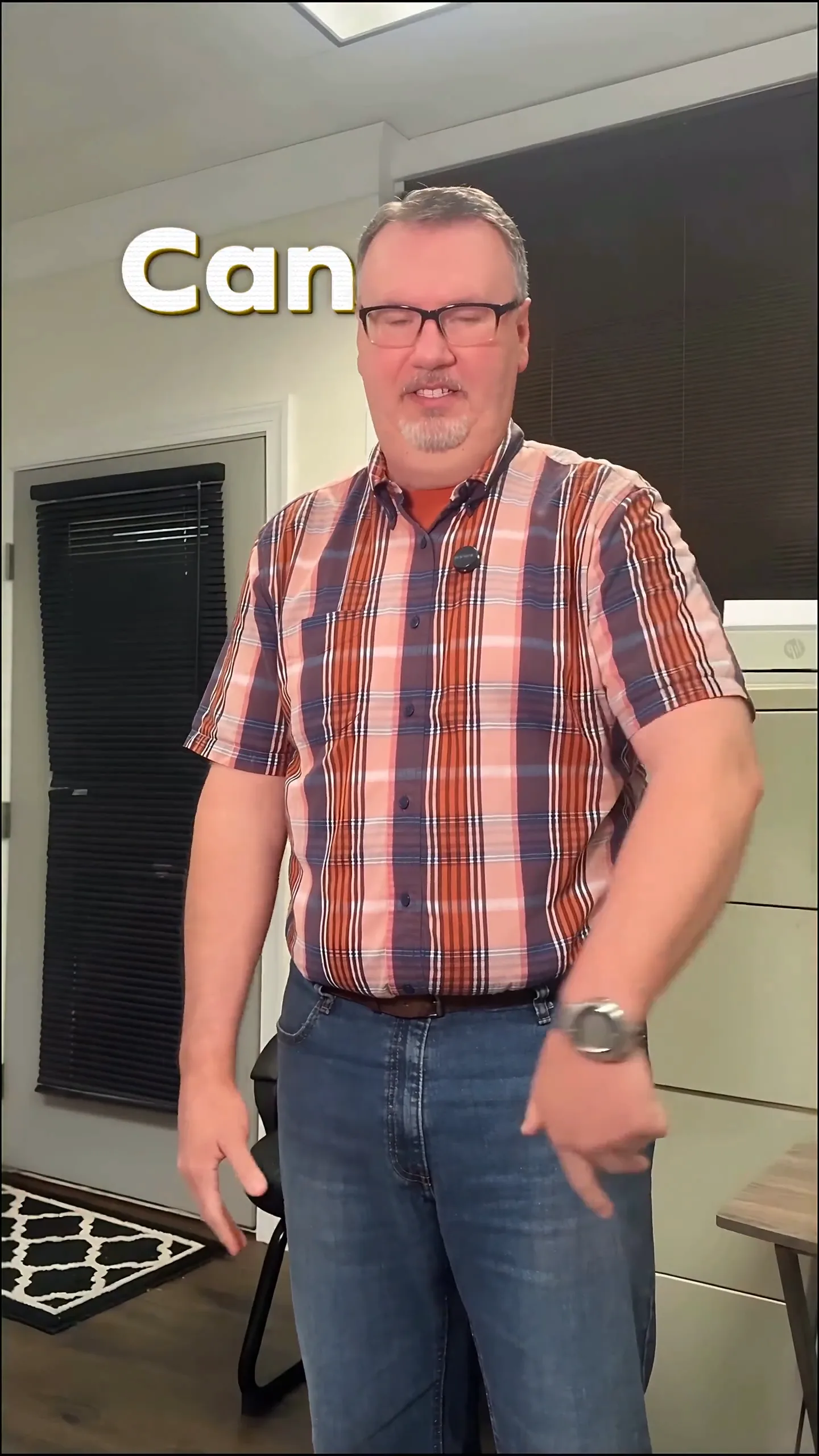
- Enjoy Effortless Captions: Once processed, your captions will appear automatically, fully synchronized with the audio, and behind the subject.
Here's an example of what this can look like:
Troubleshooting Common Issues
- Video Too Long: If your video exceeds the length limits (15 seconds on Free, 30 seconds on Starter, 2 minutes on Agency), consider trimming it before uploading.
- Upload Format Issues: Ensure your video is in MP4 or MOV format. If not, convert it before trying again.
Comparison: Plain Captions vs. Faceless Video Effect
Plain captions simply overlay text on top of the video, which can sometimes distract or obscure the subject matter. In contrast, the faceless video effect allows captions to integrate seamlessly with the visuals, enhancing the viewing experience without detracting from the content. This can significantly improve viewer engagement and retention.
Final Thoughts
Creating a faceless video effect is a game-changer for engaging content. With Sleepy Motion’s automatic masking feature, not only do you save time, but you also enhance the quality of your videos effortlessly. If you’re looking to create stunning videos that keep your audience’s attention where it matters, Smart Captions is your go-to solution. Start your journey today with our Free plan and elevate your content like never before!
FAQs
- What is a faceless video effect?
- How can I make a faceless video using Sleepy Motion?
- Is there a free way to create faceless videos?
- What kind of videos work best for the faceless effect?
- Can I add sound effects to my faceless videos?
- What file formats does Sleepy Motion support?
Frequently Asked Questions
What is a faceless video effect?
A faceless video effect showcases the subject without focusing on their face, often using captions that appear behind them.
How can I make a faceless video using Sleepy Motion?
Upload your video, select Composite mode, and let the captions render automatically behind the subject.
Is there a free way to create faceless videos?
Yes, Sleepy Motion offers a Free plan that allows you to create videos up to 15 seconds long with watermarked captions.
What kind of videos work best for the faceless effect?
Short-form social media content, promotional videos, and product demonstrations are ideal candidates.
Can I add sound effects to my faceless videos?
Absolutely! Sleepy Motion automatically adds sound effects that enhance your captions, making your videos feel more professional.
What file formats does Sleepy Motion support?
You can upload videos in MP4 or MOV formats, making it easy to get started.
Make it yourself with Sleepy Motion
Describe the look, then drop in your video on the next step.