



How to Make Captions Like Hormozi for Short Videos
Learn to create captivating captions like Hormozi for your videos. Easy steps for ads and short-form content included!
Creating captions like Hormozi involves a bit of flair and precision. He’s known for his engaging and visually striking captions that enhance the viewer's experience. With Sleepy Motion's composite captions, you can achieve that same effect effortlessly. Here’s how to do it today.
What Style Should I Use for Captions?
For a Hormozi-style look, focus on dynamic, animated captions that truly pop on screen. Use the Composite captions mode, which places animated text behind the subject. This creates that eye-catching effect where the words seem to float behind the speaker, making the visuals look more engaging. It’s especially effective for short-form video content or ads where you want to grab attention fast.
How Do I Get Started with Captions?
- Upload Your Video: Start by uploading your video (MP4 or MOV, up to 150MB). It can be a horizontal or vertical format.
- Select the Composite Mode: This mode automatically masks your subject. Forget about manual rotoscoping or intricate adjustments. Just upload, and everything else is done for you. The engine identifies the main subject and places the captions behind them seamlessly.
- Customize Your Captions: Choose from various presets to match your desired look. For a bold, vibrant style, consider the Viral Insta preset. This option provides punchy captions that pop on every word, perfect for attracting viewers on platforms like Instagram or TikTok.
- Add Sound Effects: Don’t overlook sound effects! Sleepy Motion automatically adds relevant sounds synced to your captions. This can turn a simple talking video into a more engaging experience. It’s a pro feature that makes a noticeable difference.
Example Workflow for Short-Form Creators
Let’s say you have a quick 15-second tip video. Here’s how it would look:
- Upload: A clip of you sharing a marketing insight.
- Select Composite Mode: The captions will animate behind you as you talk.
- Preset Choice: You pick the Viral Insta preset.
- Result: Your words will appear lively and engaging, enhancing your brand's appeal.
You can also check out this example of Composite captions in action:
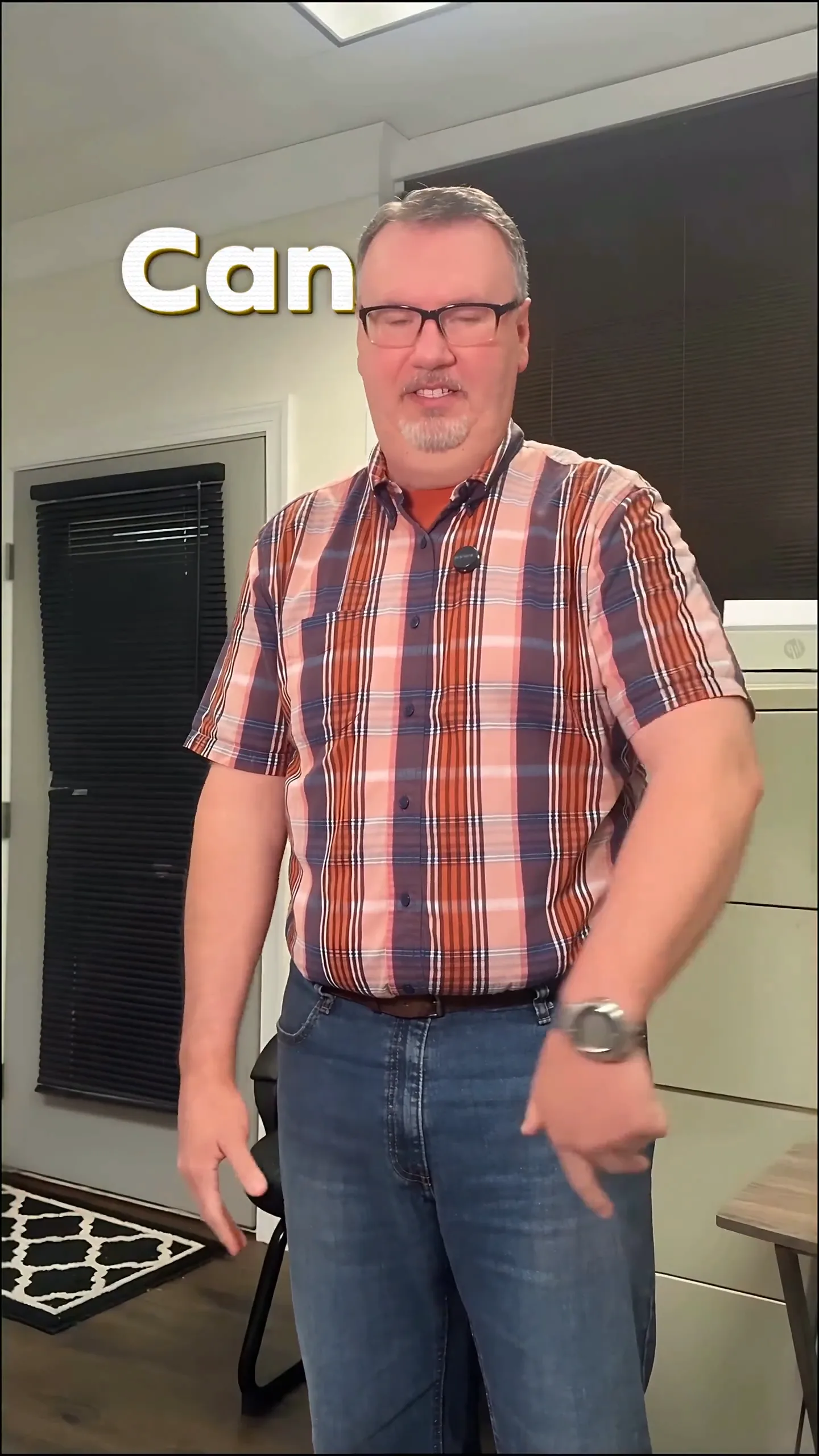
Style your captions
Describe the look, then drop in your video on the next step.
What About Video Ads?
For video ads, clarity and impact are crucial. You want your message to be understood quickly, and captions can help with that. Using Composite captions, your product mentions can stand out beautifully. Here’s a practical step:
- Create a 30-second ad showcasing your product.
- Follow the same upload and mode selection steps as above.
- Custom Presets: You might want to go for the Ruby Gilt preset for a luxurious look, or Paper Fluo for something fun and energetic.
Once done, your video ad will feature captions that not only convey the message but do so in a way that’s visually captivating, reminiscent of Hormozi's engaging style.
Troubleshooting Common Issues
- Poor Timing: If the captions don’t sync well, check if the video quality is good. Higher-quality uploads yield better results.
- Masking Errors: If the subject isn't masked correctly, try a different angle or ensure there’s good contrast between the subject and the background.
Plain Captions vs. Animated Captions
Plain captions just sit on top of the video and don’t have the engaging visual dynamism of animated captions. Animated captions, especially in Composite mode, create an immersive viewing experience that complements the content. They also help maintain viewer attention longer, which is essential for brand recall.
Conclusion: Get Started Today!
You can start creating captions like Hormozi for free! Use the Free plan to upload videos up to 15 seconds long and explore the powerful Composite captions mode. This includes the ability to add animated captions behind your subject without any manual editing or complex processes.
So why wait? Create your engaging captions now with Sleepy Motion and make your videos more captivating than ever! animated captions can elevate your content instantly.
Example Prompt
"bold captions behind me that pop on every word, sound effects on each cut..."
Frequently Asked Questions
How to make captions like Hormozi?
Use Sleepy Motion's Composite mode for animated captions behind the subject.
Can I add sound effects to my captions?
Yes, Sleepy Motion automatically adds sound effects synced with your captions.
What’s the best style for video ads?
Consider using the Ruby Gilt or Viral Insta presets for impactful video ads.
How long can my videos be with the free plan?
You can upload videos up to 15 seconds long on the free plan.
Is it hard to create captions?
No, just upload your video and select the Composite mode for automatic captioning.
Can I customize caption styles?
Yes, you can choose presets and customize effects for your captions.
Make it yourself with Sleepy Motion
Describe the look, then drop in your video on the next step.