
Best Karaoke Captions: Add Fun Text to Your Videos
Learn how to create engaging karaoke captions for your videos with Sleepy Motion's easy-to-use features.
Karaoke captions are the fun, animated texts that appear on-screen, allowing viewers to sing along with the music. They enhance the karaoke experience by making it easy to read the lyrics and follow the beat. With Sleepy Motion, you can create these engaging captions quickly and easily without any complex editing software. Let’s dive into how you can get started today.
What Are Karaoke Captions?
Karaoke captions are animated subtitles that display lyrics in sync with the music. They highlight each word in time with the song, making it easy for your audience to sing along. Using Sleepy Motion, you can add these fun captions to your videos effortlessly, enhancing viewer engagement and enjoyment.
How to Create Karaoke Captions with Sleepy Motion
- Sign Up for Free: Start by signing up for our free plan, which allows you to create karaoke captions for videos up to 15 seconds long. This is a great way to test how karaoke captions can elevate your content.
- Upload Your Video: Select your karaoke video file in MP4 or MOV format, up to 35MB for free accounts. Simply upload it to the Sleepy Motion platform.
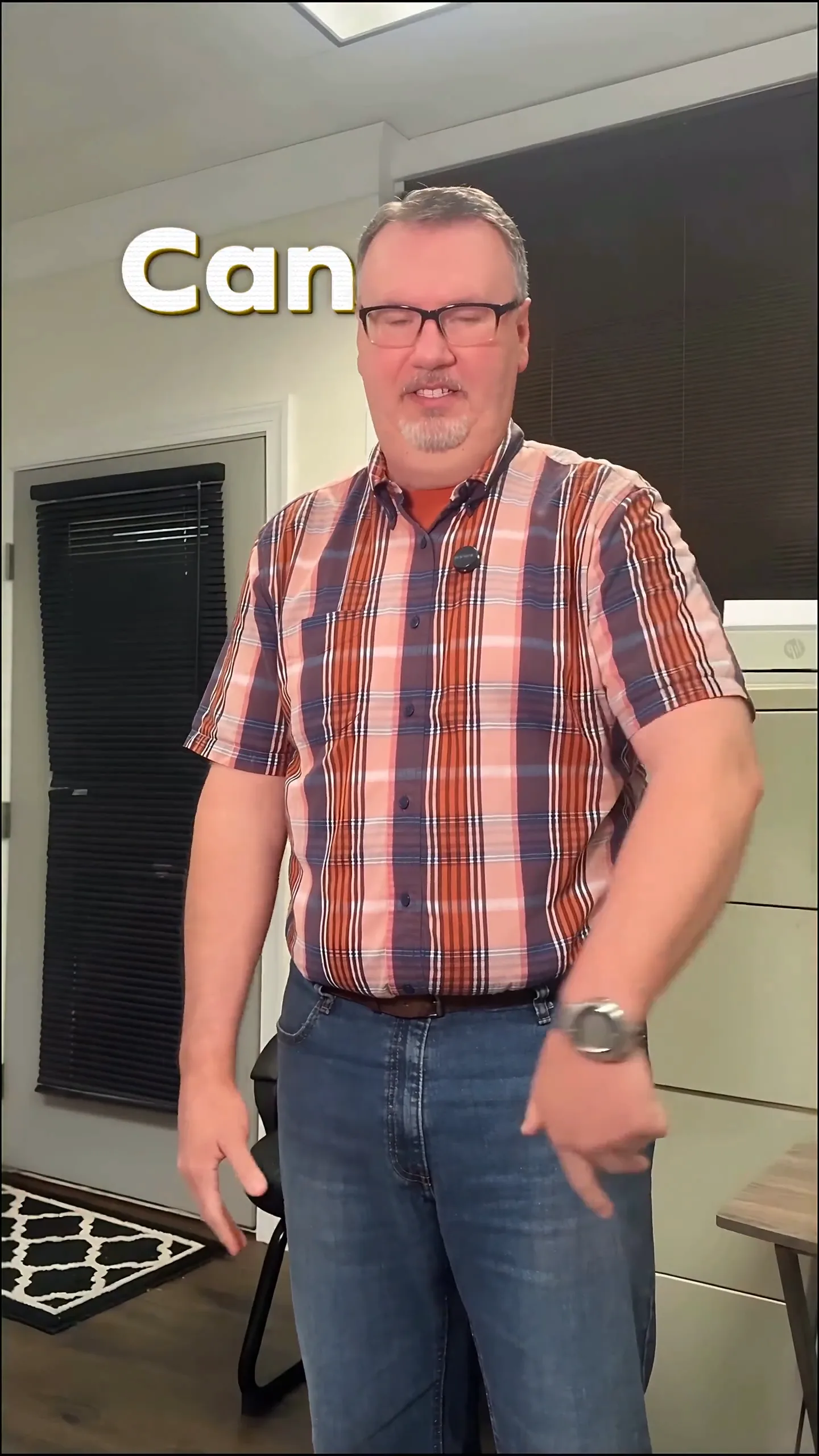
- Select Caption Style: Choose your caption style. For a karaoke vibe, the Viral Insta preset is ideal as it features bold, punchy captions that pop on-screen. This preset places the text behind the subject, making it visually appealing.
- Automatic Captions: Our platform automatically transcribes the lyrics and syncs them with the music. You don’t have to worry about timing or placement; the AI takes care of it all. Each word will be positioned dynamically, ensuring no text gets lost behind the person singing.
- Add Effects: Enhance your captions further with optional sound effects and animations. This can create a more lively atmosphere, perfect for karaoke videos.
- Download Your Video: Once you're satisfied with the captions and effects, download your video. It’s ready to share on social media or any platform you choose!
Here’s how your karaoke captions might look when animated:
Style your captions
Describe the look, then drop in your video on the next step.
Examples of Karaoke Captions in Use
- Short-Form Creators: If you’re a TikTok or Instagram Reels creator, karaoke captions can take your lip-sync videos to the next level. Imagine your audience singing along while you perform—having animated text behind you makes it visually appealing and easy to follow.
- Video Ads: If you’re promoting a karaoke night at a local bar or a karaoke app, using animated captions in your promotional video can capture attention. Dynamic, engaging karaoke captions not only provide the song lyrics but also encourage viewers to join in.
Why Choose Sleepy Motion for Karaoke Captions?
Unlike traditional editing software, Sleepy Motion simplifies the process. You don’t need to manually edit each clip or worry about syncing lyrics—our intelligent engine handles it all automatically from one upload.
Troubleshooting Common Issues
- Caption Timing Off: If your captions appear out of sync, double-check the audio file you uploaded. Ensure that it’s clear and that the lyrics are correctly timed in the original track.
- Video Too Long: Remember, the free plan has a 15-second limit. If you need longer videos, consider upgrading to the Starter plan for 30 seconds or the Agency plan for up to 2 minutes.
Conclusion
Creating engaging karaoke captions doesn’t have to be a chore. With Sleepy Motion, you can effortlessly add animated lyrics to your videos, making them more interactive and entertaining. Start with a free account today and see how easy it is to enhance your video content with karaoke captions. Check out our animated captions to see the difference!
Example Prompt
"karaoke captions behind me that pop on every word, with sound effects for each lyric..."
Frequently Asked Questions
What are karaoke captions?
Karaoke captions are animated lyrics that sync with the music, making it easy for viewers to sing along.
How do I create karaoke captions?
Upload your video to Sleepy Motion, select a caption style, and let our AI generate and sync the captions automatically.
Can I use karaoke captions for ads?
Yes, using karaoke captions in video ads can enhance engagement and attract more viewers.
What’s the best caption style for karaoke?
The Viral Insta preset is great for karaoke, featuring bold, eye-catching text that enhances viewer experience.
Is it free to create karaoke captions?
Yes, you can create karaoke captions for free on videos up to 15 seconds long.
Can I add sound effects to karaoke captions?
Absolutely! Sleepy Motion automatically adds sound effects to your karaoke captions, enhancing the overall experience.
Make it yourself with Sleepy Motion
Describe the look, then drop in your video on the next step.