

Best Caption Style for Reels: Get Engaging Animated Text
Discover the best caption style for reels to boost engagement. Learn how to create animated captions that stand out today!
What is the Best Caption Style for Reels?
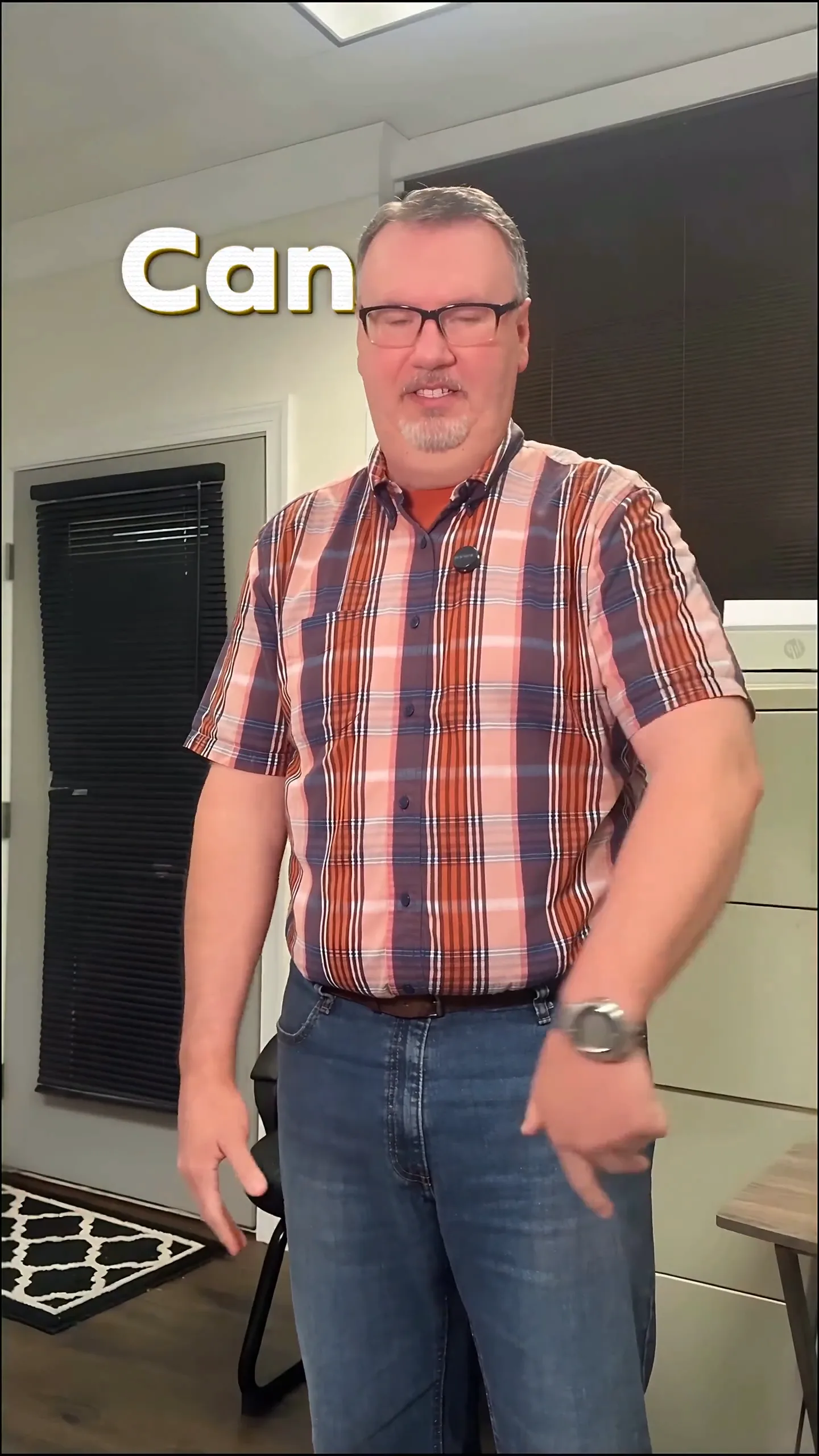
The best caption style for reels combines bold, engaging text with animation that enhances viewer engagement. Animated captions, especially those that move behind the subjects, create a visually appealing effect without overwhelming the content. This style makes it easy for viewers to follow along while keeping the focus on the creator's message. If you want to make your captions pop, animated captions are the way to go.
How Can I Add Animated Captions to My Reels?
With Sleepy Motion, adding animated captions to your reels is incredibly straightforward. You simply upload your video, choose the desired caption style, and let the platform handle the rest. Here’s how to do it:
- Upload Your Video: Start by uploading your reel in MP4 or MOV format. Sleepy Motion supports files up to 150MB.
- Select Your Caption Style: Choose from various presets that fit your brand. For reels, the Viral Insta preset is popular for its bold, punchy look. Alternatively, Cold Comic offers a unique flair with comic-book captions that stand out.
- Let the Engine Work: Once uploaded, Sleepy Motion's AI automatically positions every caption word based on the movement in your video. For animated captions, the Composite mode is recommended as it renders the text behind your subject, making it visually striking.
- Download and Share: After the AI processes your video, you can download it and share it directly to your social media accounts.
By following these steps, you can create captivating reels that draw in viewers. For example, here’s a reel where the captions pop behind the subject:
Examples of Great Caption Styles for Short-Form Creators
1. Viral Insta Captions
These strong, attention-grabbing captions are perfect for creators looking to enhance their social media presence. They blend seamlessly with the content while ensuring that the message is not overshadowed. With animated effects, each word comes alive, keeping the audience engaged.
2. Cold Comic Captions
This style adds a fun twist to your reels, using comic-book aesthetics to make your captions visually interesting. It’s particularly effective in lifestyle or entertainment content where you want to add a little personality. The animated text behind the subject keeps viewers focused on your message without distraction.
3. Pinned Captions
If you prefer more control over the placement of your captions, the Pinned preset allows you to choose where the text appears in your video. This is ideal for product demos or educational content where you want specific information highlighted.
Style your captions
Describe the look, then drop in your video on the next step.
The Importance of Sound Effects
Animated captions are even more engaging when paired with the right sound effects. Sleepy Motion automatically adds sound effects synced to the caption animations, enhancing the overall viewing experience. These effects transform a simple video into a polished piece, making your content feel more professional and captivating.
How to Create a Video Ad with Engaging Captions
Video ads can also benefit significantly from animated captions. Here’s how to elevate your ad content:
- Focus on Key Messages: Identify the core messages you want to convey. These should be highlighted in your captions.
- Use the Composite Mode: This mode is perfect for ads where a product or service is showcased. The captions will render behind the subject, giving your ad an appealing layered look.
- Incorporate Effects: Use post-process effects to make your ad pop. For instance, adding a color grade can set the mood while the animated captions keep the focus on your call to action.
Here’s an example of a video ad that effectively uses animated captions:
Troubleshooting Common Issues
If you run into issues while creating your captions, here are some quick tips:
- Check Upload Limits: Ensure your video is within the size limits: 150MB for paid plans and 35MB for free.
- Format Matters: Upload your videos as MP4 or MOV for the best results.
- Select the Right Preset: If your captions are not appearing as expected, double-check that you’ve selected the appropriate preset style.
Conclusion
In conclusion, the best caption style for reels involves using animated captions that enhance your content without overshadowing it. Sleepy Motion simplifies this process by offering engaging presets like Viral Insta and Cold Comic, allowing you to create professional-looking videos with minimal effort. Try out the animated captions for your next reel to see the impact they can make!
Example Prompt
“bold captions behind me that pop on every word, sound effects on each cut...”
Frequently Asked Questions
What is the best caption style for reels?
The best caption style for reels is animated captions that enhance engagement, such as Viral Insta or Cold Comic.
How do I create animated captions for my reels?
Simply upload your video to Sleepy Motion, choose a caption style, and let the AI handle the rest.
Can I use sound effects with my captions?
Yes, Sleepy Motion automatically adds sound effects synced to your animated captions.
What formats can I upload for captions?
You can upload MP4 or MOV videos up to 150MB for paid plans and 35MB for the free plan.
How do I make my captions stand out?
Choose engaging presets like Viral Insta or Cold Comic and use animated effects for added impact.
Can I customize the caption placement?
Yes, using the Pinned preset allows you to position captions wherever you want in the video.
Make it yourself with Sleepy Motion
Describe the look, then drop in your video on the next step.