


How to Create a Depth Text Effect Video Quickly
Learn how to add a depth text effect to your videos effortlessly, making your captions pop behind the subject.
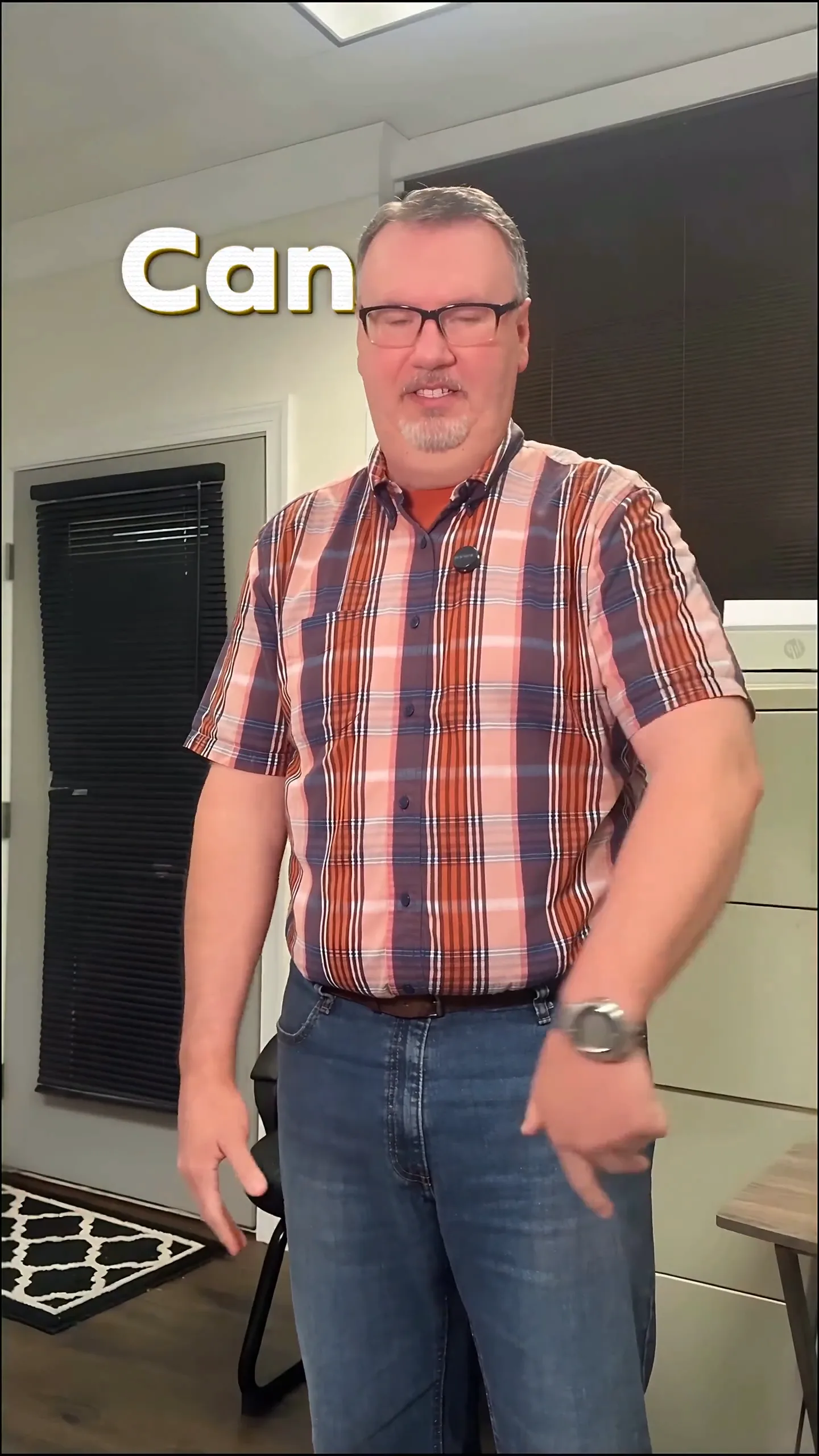
Creating a depth text effect video means placing animated text behind your subject, making the text look like it’s part of the scene rather than just floating on top. This effect enhances the visual appeal of your videos and keeps viewers focused on your message without distraction. You can achieve this easily with automated tools, eliminating hours of manual editing.
What is a Depth Text Effect?
The depth text effect is a stylish way to present your captions, ensuring they don't cover your subject. Instead, the text appears behind your speaker, highlighting their presence and keeping the focus on them while still conveying the message. This effect is especially effective for short-form content on platforms like Instagram Reels and TikTok, where grabbing attention quickly is essential.
How Can I Create a Depth Text Effect Video?
To create a depth text effect video, you can use tools like Sleepy Motion's Composite mode. Here’s a simple step-by-step workflow:
- Upload Your Video: Choose an MP4 or MOV file up to 150MB — Sleepy supports vertical and horizontal formats.
- Select Your Style: Choose from various preset styles, such as Viral Insta or Paper Fluo, to give your captions a unique look.
- Watch the Magic: Once you upload, the Composite mode automatically masks your subject, rendering the animated text behind them. No manual rotoscoping or adjustments are necessary. Just sit back and let the technology do the work.
- Add Sound Effects: Enhance the depth by adding automatic sound effects that sync perfectly with your text animations, making your video feel professional without any extra effort.
Examples for Short-Form Creators
Short-form creators can benefit immensely from using depth text effects. For instance, if you're creating a quick tutorial or a catchy promotional video:
- Tutorial Video: Imagine you’re explaining a recipe. As you demonstrate, the instructions appear behind you, making it easy for viewers to follow while keeping the focus on your actions. This approach encourages engagement as viewers can see both the recipe and the cooking process simultaneously.
- Promotional Ad: For a product advertisement, you might want to highlight the features while showing the product in use. The depth text effect allows you to display key points behind the person using the product, creating a seamless interaction that captivates potential buyers.
How to Get Started Today
You can begin experimenting with depth text effects today for free. With Sleepy Motion's free plan, you can upload videos up to 15 seconds long and test the Composite mode with watermarked captions. This is a perfect opportunity to see how the depth text effect enhances your videos without any commitment.
Style your captions
Describe the look, then drop in your video on the next step.
Troubleshooting Tips
If your depth effect doesn’t look right initially, consider the following:
- Lighting: Ensure your subject is well-lit against the background. This helps the automatic masking process.
- Video Quality: Higher quality videos yield better results in terms of masking accuracy.
- Motion: If your subject is moving quickly, ensure they’re in focus to help the engine track them effectively.
Why Use Depth Text Effects in Your Videos?
Using depth text effects enhances the viewing experience. They keep your audience engaged by making content more visually appealing and reducing distractions caused by text overlaying the subject. It’s also a time-saver since the Composite mode automates what traditionally requires hours of manual editing.
For further exploration of how to add this effect, check out the guide to put text behind your subject. By employing these techniques, you can elevate your videos and connect better with your audience.
Final Thoughts
Creating a depth text effect video is straightforward and can significantly improve your content’s quality. With Sleepy Motion’s easy-to-use tools, you can focus on your message while your captions work seamlessly in the background. Dive in today and transform the way you present your videos!
Example Prompt
"depth captions that stay behind me while I talk, with cool sound effects..."
Frequently Asked Questions
What is a depth text effect video?
It's a video where captions are placed behind the subject, enhancing visual appeal.
How do I put text behind a person in a video?
Use tools like Sleepy Motion's Composite mode, which automatically masks the subject.
Can I add depth text effects for free?
Yes, you can create videos up to 15 seconds long on the free plan.
What types of videos can benefit from depth text effects?
Short-form videos, tutorials, and promotional ads are all great candidates.
Why should I use animated captions instead of plain captions?
Animated captions are more engaging and visually appealing, keeping the audience focused.
Is it easy to create depth text effects?
Yes, with the right tools, it can be done automatically from a single upload.
Make it yourself with Sleepy Motion
Describe the look, then drop in your video on the next step.